
Software without an interface: can an AI agent simply operate the program?
A computer-using agent operates business software through the screen, just like an employee. When this makes sense, what it costs and which safeguards apply.
Yes, it can. A so-called computer-using agent sees the screen, moves the mouse and keyboard and operates a program like an employee. This is the solution for business software that has no interface. However, it is slower, more expensive per transaction and more error-prone than a proper interface, and it needs clear guardrails.
We hear this question from businesses whose industry software displays data but does not allow write access from outside. The vendor offers no interface, or it is expensive and takes months. At the same time, an AI agent is supposed to enter data in exactly that place. Here is an honest assessment.
What is a computer-using agent?
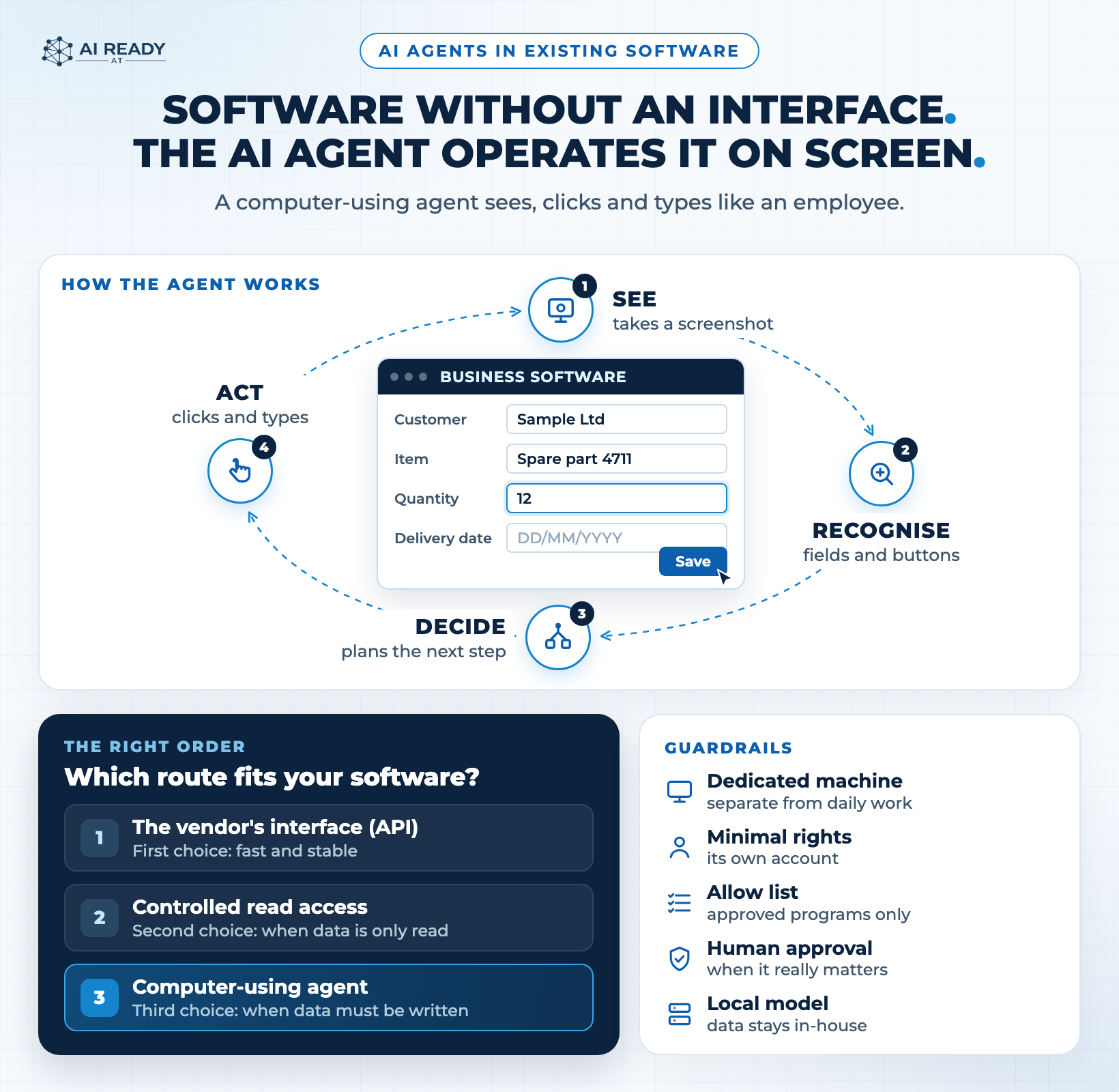
A computer-using agent, CUA for short, works in a loop. It takes a screenshot, recognises fields and buttons, decides on the next step, clicks or types and then takes another screenshot. It repeats this until the task is done. Anthropic describes its tool in exactly this way: the model controls a desktop through screenshots, mouse and keyboard.
Microsoft has since built this into Copilot Studio. Its documentation essentially says: if a person can use an application, this tool can too. Microsoft names data entry, invoice processing and data extraction as typical uses. Importantly, because an AI model reads the screen, the agent can cope with small changes to the interface that often break classic click robots.
How well does it really work today?
The best public benchmark is OSWorld. Agents are given real tasks in real programs such as spreadsheets, browsers or email clients. Progress is steep, but the figures also show the limits.
- 2024: OSWorld launches with 369 tasks. Humans solve 72.36 percent, the best AI model only 12.24 percent.
- 16 December 2025: The vendor Simular states that its Agent S reached 72.6 percent, exceeding the human score for the first time. This is a vendor claim.
- OSWorld 2.0: The new version tests 108 long workflows. A human needs a median of around 1.6 hours for them. The best model listed there completes only 20.6 percent of these workflows in full.
- Cost per step: In Copilot Studio, each step costs 5 Copilot Credits, or 15 with a premium model. A form with four steps therefore costs 20 or 60 credits.
- Data volume: According to Anthropic, each screenshot takes up around 1,000 to 1,800 input tokens. Long workflows therefore grow quickly.
The lesson: short, clearly described tasks in a familiar program work well today. Long workflows across many programs without supervision are not yet a sure thing. That is exactly why every such agent needs a person who checks.
When is a proper interface better?
Almost always, if one exists. An interface delivers data in a fixed format, is fast and reports errors clearly. An agent on screen has to see, interpret and check every step. That costs time and money per transaction.
In our projects we therefore proceed in this order:
- First choice: an official interface from the vendor.
- Second choice: controlled read access to the data, if it only needs to be read.
- Third choice: a computer-using agent, if data has to be written and there is no other way.
The third choice has a real advantage that is often underestimated. The agent works through the normal user interface, with its own user account and the same rights as any employee. It needs no special database access and no lengthy coordination with the software vendor. The software stays as it is. Whether operation by an agent is compatible with the software's licence agreement should be checked in advance.
How does such an agent stay secure?
An agent that is allowed to click can also click the wrong thing. Both major providers say this openly and recommend similar safeguards. Anthropic also warns that in some cases the model may follow instructions it finds on a web page or in an image, even if they contradict its own instructions. Experts call this prompt injection.
The safeguards from the Anthropic and Microsoft documentation, summarised:
- Dedicated machine: a separate virtual machine just for the agent, kept apart from day-to-day operations.
- Minimal rights: its own user account with exactly the rights the task needs.
- Allow list: approved websites and programs only.
- A person decides: confirmation by a human for anything with real consequences.
- Protected credentials: no passwords in the task description, but in a protected store.
We add one point that is decisive for many businesses: which data does the AI model see? Every screenshot shows what is currently on screen, which is often customer data. Anyone who does not want to send this to a third-party cloud can run the agent with a local model on their own server. The screenshots then never leave the building. In addition, our AIROS Gateway checks what goes to external AI services before it leaves.
Which tasks are worth it?
Good candidates share three characteristics. The task occurs frequently. It always follows the same pattern. And at the end, a person can check the result quickly. Typical examples:
- Transferring data from an email or a PDF into business software.
- Reading values from an old program that has no export function.
- Querying a web portal regularly and passing on the result.
Less suitable are rare special cases, workflows with many exceptions and anything where a mistake costs money straight away and nobody checks it any more.
What does this mean for businesses in Carinthia?
There is real interest in exactly this kind of implementation. The Carinthian Chamber of Commerce (WKO Kärnten) and the State of Carinthia offered an AI implementation grant: six hours of consulting and implementation, funded at 100 percent, explicitly for assistants, workflows, automations and prototypes. As of 9 September 2026, WKO Kärnten reports that the funding has been fully used up.
For many Carinthian businesses, the topic is therefore no longer a project for the future. Here too, the typical hurdle is rarely the AI itself, but business software that has no door to the outside. A computer-using agent is built for exactly this case. The key is to use it deliberately as the third choice, with its own account, tight rights, logging and a person who approves. How we support businesses in Villach, Klagenfurt and across Carinthia is described under AI consulting in Carinthia.
If you would like to know which route suits your software, we can look at it together. You can find out more about how we integrate AI agents into existing workflows under Solutions: AI agents.